logo
Products
quote
Products
Products
Products
Home > Products > Developer Unit > Original new Developer Unit N500D600K for Sindoh N510 N511 N512 A3 Copier parts
Catagories
Contacts
Contacts: Mr. Jessie
Fax: 86-0757-86771039
Contact Now
Mail Us

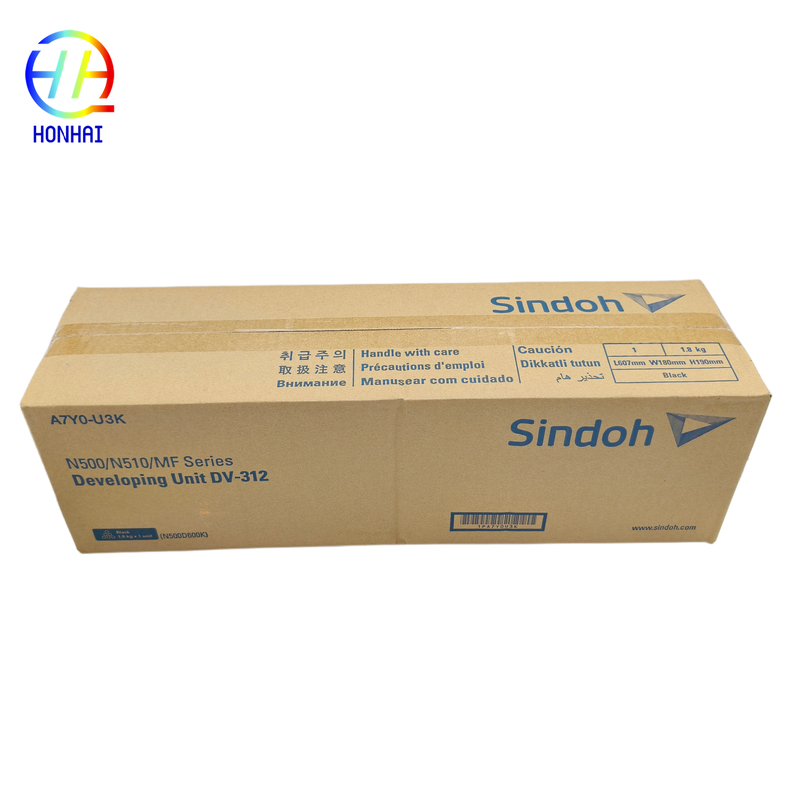
Original new Developer Unit N500D600K for Sindoh N510 N511 N512 A3 Copier parts

Product Details

Place of Origin: China

Brand Name: Sidon

Model Number: N500D600K

Payment & Shipping Terms

Minimum Order Quantity: 10

Packaging Details: Neutral Packing

Delivery Time: 3-7 work days

Payment Terms: Western Union,T/T

Supply Ability: 5000 piece/Month

Get Best Price
Highlight:

Original Developer Unit N500D600K

,

Sindoh N510 developer unit

,

A3 copier developer unit

Estimated Yield:
Approx. 600,000 Pages (Based On A4 Size, 5% Coverage Standard)
Product Type:
Core Imaging Consumable For Monochrome Digital Copiers
Compatible Models:
Sindoh N510, N511, N512 A3 Copiers
Condition:
100% Brand New Original OEM
Estimated Yield:
Approx. 600,000 Pages (Based On A4 Size, 5% Coverage Standard)
Product Type:
Core Imaging Consumable For Monochrome Digital Copiers
Compatible Models:
Sindoh N510, N511, N512 A3 Copiers
Condition:
100% Brand New Original OEM
Original new Developer Unit N500D600K for Sindoh N510 N511 N512 A3 Copier parts

The Developer Unit does a pretty good job at creating images that can be seen. It turns laser-written images on your printer’s drum into something you can actually see, which is a great thing because without this unit, you wouldn’t have pictures or words that make sense.

Imaging: The specific engineering of the magnetic rollers and developer sleeve ensures that toner is evenly distributed across the page when you print, which leads to darker and bolder images compared to your plain pages.

Maintenance: When you install the Developer Unit into your printer, it is designed for up to 600,000 prints, giving you virtually no maintenance for the entire lifetime of the machine. This provides additional savings to you.

Compatibility: This item is designed and customized for use with the Sindoh N510/N511/N512 series A3 printers. It fits the motherboard and developer bias, thereby preventing any error codes from coming up due to not having compatible items.

Green Friendly: The Developer Units are sealed with high-quality materials, thus reducing any instances of toner leaking and waste toner generation, creating a green office environment.

Original new Developer Unit N500D600K for Sindoh N510 N511 N512 A3 Copier parts 0

Original new Developer Unit N500D600K for Sindoh N510 N511 N512 A3 Copier parts 1

Original new Developer Unit N500D600K for Sindoh N510 N511 N512 A3 Copier parts 2

Installation & Usage Precautions

To ensure optimal lifespan and print quality, strictly adhere to the following guidelines during installation and daily use:

1. Pre-Installation Preparation
  • Power Off: Always turn off the copier and unplug the power cord before installing or replacing the developer unit. Allow the machine to cool down (especially the fuser area) to prevent burns or electrostatic damage to the motherboard.
  • Inspect Packaging: Check the unit for physical damage upon unboxing. Ensure all protective seals and covers are intact. Do not use units with damaged packaging or moisture exposure.
  • ESD Protection: The unit contains sensitive electronic contacts. Always hold it by the designated handles. Avoid touching the developer sleeve surface or metal contacts to prevent contamination from skin oils or static electricity.
2. Installation & Calibration
  • Smooth Insertion: Align the developer unit with the machine's internal guide rails and push it in horizontally and steadily. Do not force it. If significant resistance is met, remove it to check the orientation or for obstructions.
  • Toner Supply: The new developer unit comes pre-loaded with a standard carrier. Upon first power-up, the machine will automatically initialize and supply toner. Wait for the on-screen prompt to complete; do not interrupt the power supply during this process.
  • Auto Calibration: After replacing the developer unit, it is highly recommended to run an "Auto Density Adjustment" or "Developer Bias Calibration" via the maintenance menu to ensure optimal output quality.
3. Daily Maintenance & Storage
  • Environment: Place the equipment in a well-ventilated, dry, and dark environment. Avoid high temperatures, high humidity, or direct sunlight to prevent the carrier inside the unit from clumping or degrading.
  • Regular Cleaning: When replacing toner or the OPC drum, clean any waste toner or paper debris from the developer unit installation slot to maintain internal cleanliness.
  • Spare Storage: Store unused developer units in their original packaging, laid flat in a cool, dry place. Avoid stacking heavy items on top or storing them upright, which can cause uneven distribution of the internal carrier.
4. Safety & Disclaimer
  • Do Not Disassemble: The developer unit is a highly precise, sealed assembly. Unauthorized disassembly will result in carrier leakage, magnetic roller damage, and total failure, and will void the warranty.
  • Disposal: Dispose of the old developer unit in accordance with local regulations for electronic waste or office consumable recycling to prevent environmental pollution.